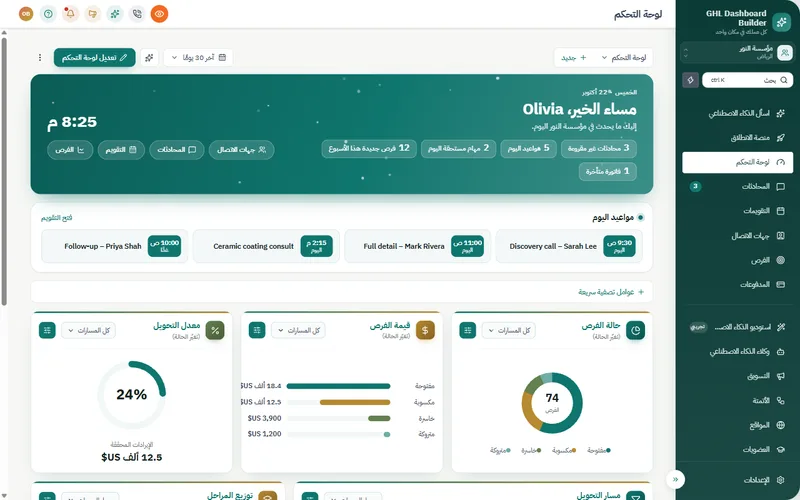
Included:Live menu countWelcome banner with live figuresAppointments boardPrivacy modeBrand-colour icons
About the Noor HighLevel template
HighLevel fully in Arabic and right to left: menu, screens, welcome banner and live figures, on a deep-emerald menu with gold accents.
Premium template: Hover any menu item to see all its pages, plus a dashboard welcome banner with greeting, clock and quick links.
- Layout
- Sidebar
- Mood
- Dark sidebar
- Navigation
- HighLevel's menu in Arabic, on the right
- Login page
- Brand panel with an Arabic welcome
- Style
- Arabic, Right to left
- Right-to-left
- Yes — Arabic, Hebrew and Urdu menus mirror correctly
- Palette
- #0F766E#0B3B36#F6F7F5#B7892F
- Best for
- arabic, rtl, emerald, gold, gulf
What Noor installs in HighLevel
- ✓Live menu count
- ✓Welcome banner with live figures
- ✓Appointments board
- ✓Privacy mode
- ✓Brand-colour icons
How to use Noor
- Click through the live preview above — switch between desktop, tablet and phone, or change the language.
- Open it in the builder and swap in your logo, colours, fonts, menu names and login page. No sign-up needed.
- Pick a plan to get your install code, then paste it into HighLevel's Custom Code settings. Every sub-account picks up the new look.
Guides
More HighLevel templates
See all 31 templates →
We use Google Analytics cookies to understand how visitors use this site, only if you allow it. Privacy policy