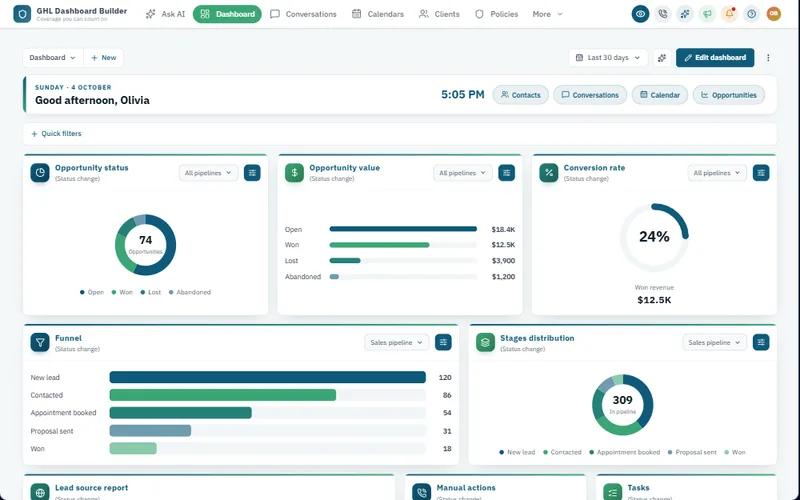
Steel teal and sea green with top navigation for insurance, mortgage and finance teams, with solid-bar privacy mode for client calls and pinned favourites.
Included:Live menu countWelcome bannerFavouritesPrivacy mode (solid bars)Top navigationRenamed menu
About the Harbor HighLevel template
Steel teal and sea green with top navigation for insurance, mortgage and finance teams, with solid-bar privacy mode for client calls and pinned favourites.
Top bar template: The menu moves into a full-width top bar with a More menu and a Settings mega menu, so pages get the whole screen.
Layout
Top navigation
Mood
Dark sidebar
Navigation
Top navigation with teal highlights; Contacts renamed Clients and Opportunities renamed Policies, with favourites
Login page
Split layout with a soft mesh scene
Style
Trustworthy, Clean
Right-to-left
Yes — Arabic, Hebrew and Urdu menus mirror correctly
Palette
#0F5A7A#0E2A3A#F4F7F9#3BA675
Best for
insurance, mortgage, finance, corporate, top navigation
What Harbor installs in HighLevel
✓Live menu count
✓Welcome banner
✓Favourites
✓Privacy mode (solid bars)
✓Top navigation
✓Renamed menu
How to use Harbor
Click through the live preview above — switch between desktop, tablet and phone, or change the language.
Open it in the builder and swap in your logo, colours, fonts, menu names and login page. No sign-up needed.
Pick a plan to get your install code, then paste it into HighLevel's Custom Code settings. Every sub-account picks up the new look.