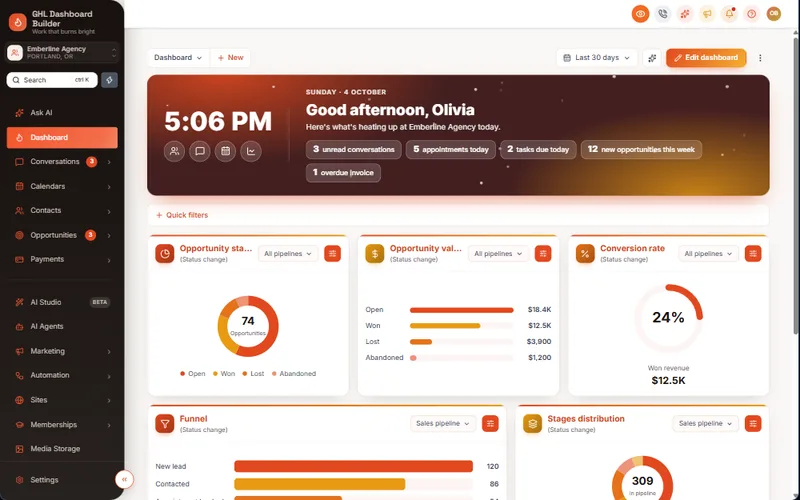
Deep charcoal with flame coral and amber: a warm, dark HighLevel with live figures in a spotlight banner, live menu counts and pop-ups for every new notification.
Included:2 live menu countsWelcome banner with live figuresNotification pop-upsPrivacy modeHover menusBrand-colour icons
About the Ember HighLevel template
Deep charcoal with flame coral and amber: a warm, dark HighLevel with live figures in a spotlight banner, live menu counts and pop-ups for every new notification.
Premium template: Hover any menu item to see all its pages, plus a dashboard welcome banner with greeting, clock and quick links.
Layout
Sidebar
Mood
Dark sidebar
Navigation
Charcoal sidebar with brand-coloured icons and hover flyouts, with live counts
Login page
Centred card over an orbit scene
Style
Warm, Dramatic
Right-to-left
Yes — Arabic, Hebrew and Urdu menus mirror correctly
Palette
#F2552C#17110F#FAF7F5#F5B031
Best for
dark, warm, agency, creative, dark sidebar
What Ember installs in HighLevel
✓2 live menu counts
✓Welcome banner with live figures
✓Notification pop-ups
✓Privacy mode
✓Hover menus
✓Brand-colour icons
How to use Ember
Click through the live preview above — switch between desktop, tablet and phone, or change the language.
Open it in the builder and swap in your logo, colours, fonts, menu names and login page. No sign-up needed.
Pick a plan to get your install code, then paste it into HighLevel's Custom Code settings. Every sub-account picks up the new look.